***Link: https://docs.google.com/spreadsheets/d/1DFCN5-UUv9yEVBv87bDB2bu1w8OqEBf9ra3Z_H_Dk74/edit?usp=sharing
To download a copy from Google docs: File> Download> Microsoft Excel***
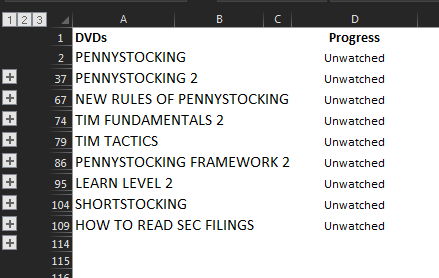
Collapsed, here is what the spreadsheet will look like:
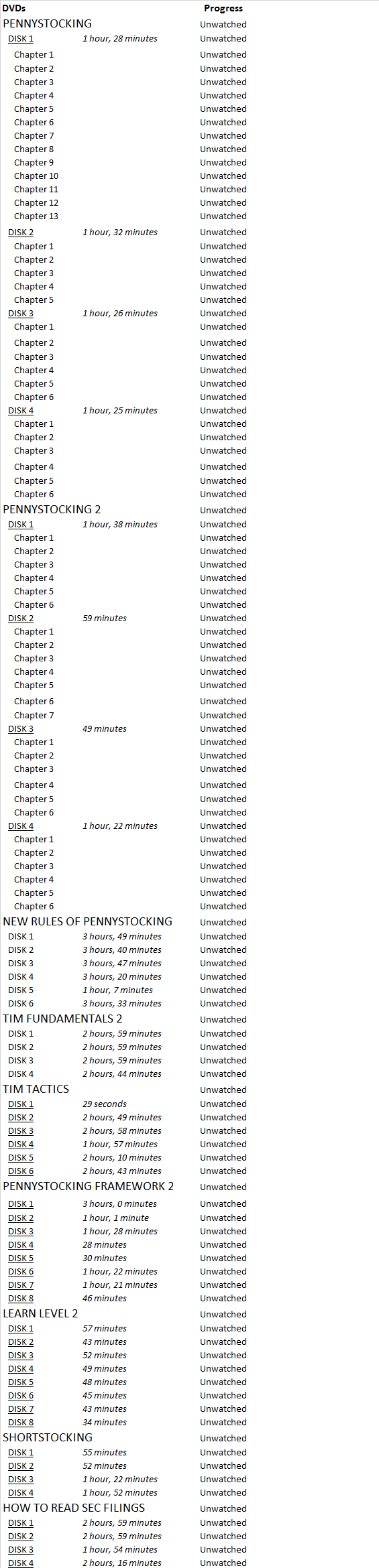
Expanded (you can also track progress by disk or chapter):
Progress column has a dropdown of 3 options: complete, in progress, and unwatched. There is conditional formatting to change color of your progress (green for in progress, blue for complete).
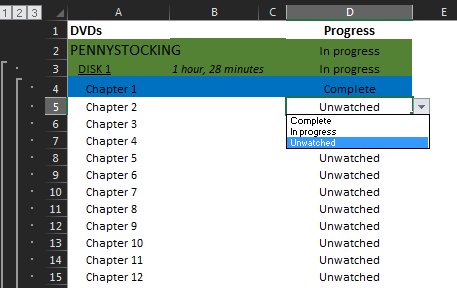
If you would like to change to another color, go to Home> Conditional Formatting> Manage Rules> Show formatting rules for: This Worksheet> Edit Rule> Format> Fill
Each disk has a hyperlink to the source however, due to Profit.ly hyperlink restrictions, this feature is not currently working and will send you to the Profit.ly login page. A workaround is to right-click the cell, select 'edit hyperlink', and copy the address from there, and paste directly into your URL bar.
If you would like to add this as a tab in your main spreadsheet, make sure your main spreadsheet is open, right click on the Tim Challenge Progress tab, select 'move or copy'> To book: [your spreadsheet]

Thanks for sharing this - super cool!
@scaredcynical Sure thing! Glad someone else can get some use out of it!
Join now or log in to leave a comment